

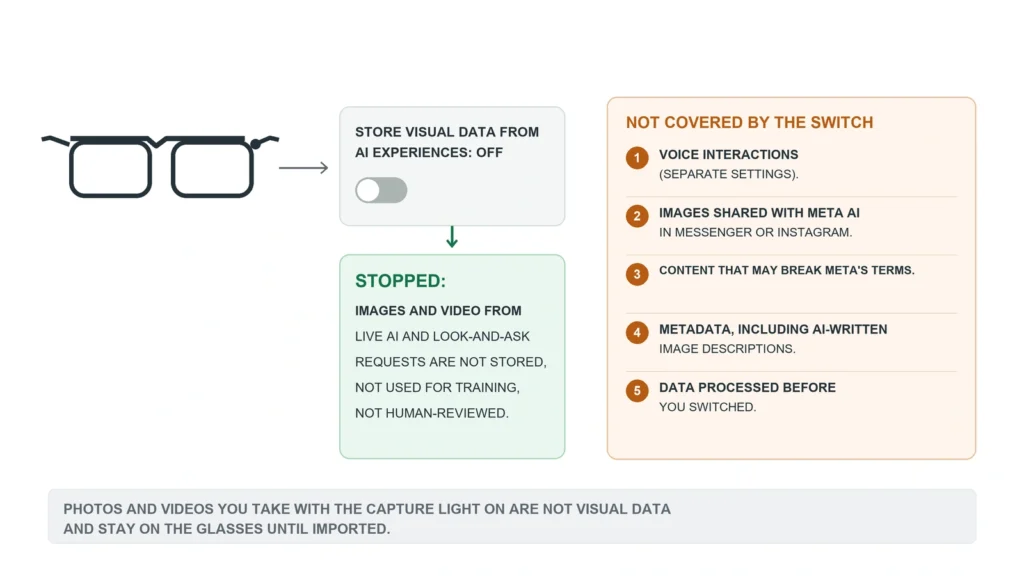
Four taps in the Meta AI app now stop Meta from keeping what your glasses see when you ask its AI about it. The switch is called “Store visual data from AI experiences”, and it began reaching owners in the week of 23 September 2026. With visual data storage off, Meta says the images and video behind a live AI session or a “what am I looking at” question are used to answer you and then not stored, not used to train its models and not shown to human reviewers. The switch has limits, and Meta’s help page lists them: your voice, the text descriptions the AI writes and anything processed before you flip it all fall outside.
Switching it off
Open the Meta AI app, go to your glasses’ settings, tap Meta AI under Experiences and turn off Store visual data from AI experiences. The glasses need to be out of their case and connected to the phone while you do it, according to Engadget’s walkthrough, and the setting is per pair. If you own two, repeat it on the second.
The same choice appears during setup and in an in-app notice. The help page does not say whether the setting starts on or off for existing owners, so if you have never seen the notice, open the menu and look.
What counts as visual data
Meta draws the line at the capture light. Photos and videos you take on purpose, with the capture LED on, are not visual data in this sense. They stay on the glasses until you import them to your phone.
Visual data is what the camera sees for the AI: the frames sent when you ask about a sign, translate a menu or keep live AI running while you cook. With storage on, that material may be used to improve Meta’s products, including training that “may be automated or manual (human)”. Those frames often include people around you who never agreed to be filmed, the concern the Dutch privacy regulator raised about camera glasses on 22 September.
The five things the switch does not cover
Meta’s help page lists them plainly:
- Voice interactions with Meta AI
- Images and videos you share with Meta AI elsewhere, such as in Messenger or Instagram
- Images and videos that may break Meta’s terms, for example possibly illegal content
- Metadata linked to visual data, which Meta says includes AI-generated text descriptions of an image and camera exposure settings
- Visual data processed before you turned storage off
The metadata item is the one most owners will miss. When you ask “what am I looking at”, the AI turns the picture into words before it answers. The help page counts that description as metadata, not visual data, so switching storage off does not stop it being kept. The help page does not say how long such descriptions are stored or whether people review them.
The last item means the switch works forward only. Whatever was processed before you turned it off stays wherever Meta already put it.
Your voice has separate settings
Engadget reported that voice interactions remain available for training and review after this change, and Meta’s voice privacy notice, dated 22 July 2025, explains how. It describes two storage settings of their own: transcripts of what you say, which are stored by default, and audio recordings, which are stored only if you choose. When they are on, the data goes through machine learning and “trained reviewers”, vetted vendors and some employees, who hear recordings with the pitch changed.
Stored voice data is kept for up to one year. Accidental activations are deleted within 90 days once Meta’s systems spot them. Turning storage off stops new transcripts being kept, but older ones stay for the rest of their year unless you delete them in the Voice Activity Log in the Meta AI app.
What switching it off costs you
Without stored visual data, some features may be limited or unavailable, and visual reminders are the one the help page names. The case for leaving storage on is an assistant that remembers your preferences over time. Owners who ask their glasses where they parked will feel the loss. A question about a street sign gets the same answer either way.
The promise Meta made the same day
On 23 September Meta’s engineering blog also described Private Processing for its AI glasses, where requests run inside sealed servers in which, Meta writes, “even Meta cannot access your data”. It gave no date, no list of glasses and no word on whether it will be on by default. Until it ships, the visual switch, the two voice settings and the Voice Activity Log are the only controls an owner has.