Review

RayNeo X3 Pro Review: Full-Color AR Glasses With a Battery Measured in Minutes

The RayNeo X3 Pro carries a 245 mAh battery. That one number shapes everything else about these glasses, because it has to run two full-color micro-LED projectors, a Snapdragon AR1 Gen 1 chip, Wi-Fi 6, two cameras and Google's Gemini assistant. RayNeo's own product page no longer gives a runtime at all.

The X3 Pro is RayNeo's standalone AR model, above its display-free iO glasses and apart from its Air series, which are screens for watching video from a phone or console. Its closest rival is the Meta Ray-Ban Display, which has a screen in one lens only. On 25 September 2026 it sat third in B&H's best-seller order for a smart glasses search, behind a pair of Ray-Ban Meta glasses that Meta has just replaced.

This review is research-based. Nobody at this site has worn a pair, so what follows comes from RayNeo's specifications and from published reviews by Tom's Hardware, Tom's Guide and Notebookcheck.

It suits a developer or an early adopter who wants the most capable display glasses on sale and will carry a charger. For anyone who expects glasses to last a day out, the battery rules it out.
By Published Research-based assessment

Affiliate disclosure: the price links on this page may earn us a commission at no extra cost to you. Retailers cannot pay for placement or influence the score. How we stay independent

Quick verdict

RayNeo X3 Pro AI+AR Glasses
5.7/10
Editorial ratingMediocreWeighted average of 4 rated sections.

Buy it only if you want the most capable standalone AR display on sale and will use it in short sessions near a charger. Skip it if you want smart glasses for a whole day, because reviewers got well under an hour of real use from the 245 mAh battery.

Strengths

  • Full-color displays in both lenses
  • Three reviewers found the display readable outdoors
  • Gemini with camera input, translation and heads-up navigation on the glasses

Weaknesses

  • Reviewers got well under an hour of real use, and half an hour of video
  • The case cannot recharge the glasses, so a day out means carrying a power bank and a cable
  • Low resolution

Key specifications

Display
Binocular full-color micro-LED with diffractive waveguides, 640 x 480 per eye
Brightness
3,500 nits average, 6,000 nits peak (RayNeo)
Field of view
30 degrees, virtual 43-inch display at 2 m
Processor and memory
Snapdragon AR1 Gen 1, 4 GB RAM, 32 GB storage
Cameras
12 MP Sony IMX681 main camera plus a spatial camera, video up to 4K
AI and software
Gemini Live, RayNeo AIOS (Android-based), 14-language real-time translation, heads-up navigation
Battery
245 mAh, full charge in about 38 minutes over USB-C
Weight
76 g (plus or minus 1 g)
Connectivity
Wi-Fi 6, Bluetooth 5.3, USB 2.0 Type-C
Audio
Speakers in the temples, 3-microphone array with beamforming
Controls
Touch areas on both temples, shortcut and power buttons, voice, phone air mouse, Apple Watch gestures on compatible models
Prescription
Custom inserts through RayNeo's partner Lensology, sold separately
Warranty and returns
1-year warranty, 30-day returns (RayNeo store)

How we reviewed it

Basis
Research-based: assessed from the manufacturer’s published specifications, documentation and the independent sources listed at the end. We have not tested this unit ourselves; any measurement quoted belongs to the cited source.
Method

Display, optics, chip, memory, cameras, battery capacity, charging time, weight, radios, sensors, controls and the prescription route were read from RayNeo's US product page and its FAQ on 25 September 2026. Battery life, display visibility, camera quality, comfort and software behaviour come from three published reviews: Tom's Hardware, which used a pre-release unit and pre-release iOS app, Tom's Guide, and Notebookcheck, which reviewed a manufacturer sample. Demand was read from B&H's search results for smart glasses sorted by best sellers. No lab measurement of display brightness, battery drain or thermal behaviour was found, so the battery score rests on the reviewers' reported use.

Evidence

RayNeo publishes a full specification table. Three reviewers used the glasses and reported battery life independently, and their accounts agree on the direction if not the exact number. B&H's order confirms current availability and interest only.

Limitations

Tom's Hardware reviewed a pre-release unit with pre-release software, so its battery figure may not match current firmware. No lab measurement of battery drain, display brightness or heat exists for this model. RayNeo no longer states a runtime on its product page, and the earlier claim of up to five hours is known only from Tom's Hardware's review. No Amazon listing is linked, so the price table has no Amazon offer.

An hour of battery, at best

3.5/10Poor
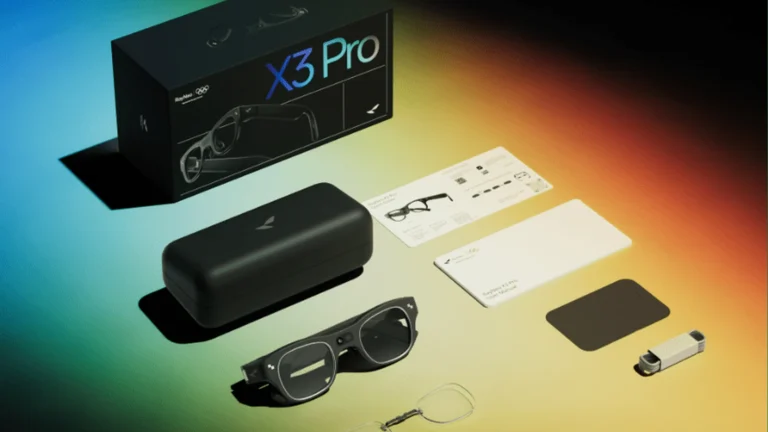
RayNeo X3 Pro box contents laid out: the glasses, a black carrying case, a USB-C cable, a cleaning cloth, a lens template, nose pads and paperwork
RayNeo's photograph of the X3 Pro box contents, cropped to 16:9. The case carries no battery. The pixels are unmodified. RayNeo product imagery

This is the section that decides the purchase. The cell is about the size you would find in camera glasses without any display at all, and here it feeds two projectors and an Android computer. RayNeo's current page gives no runtime. Its FAQ says battery life "varies significantly with usage" and names navigation, camera recording, AI processing, wireless connections and apps as the heavy users.

The reviews fill in what that means. Tom's Hardware reported that RayNeo had claimed up to five hours, and that in general use it never got more than an hour. Opening Google Maps at half charge brought a low-battery warning within ten minutes, and two songs took a few percent off. That was a pre-release unit on pre-release software, so treat it as a warning, not a final figure. Notebookcheck, reviewing later, got around 30 minutes of continuous video recording and had to recharge three times to film one outing.

Charging is quick, about 38 minutes to full over USB-C. The problem is where you do it. Notebookcheck points out that the carrying case has no battery, so there is no topping up in a pocket the way Ray-Ban Meta owners do. In practice that means a power bank and a cable, and short sessions: a translated conversation, a route through an unfamiliar station, a few photos.

Two full-color displays you can read outdoors

7.5/10Good
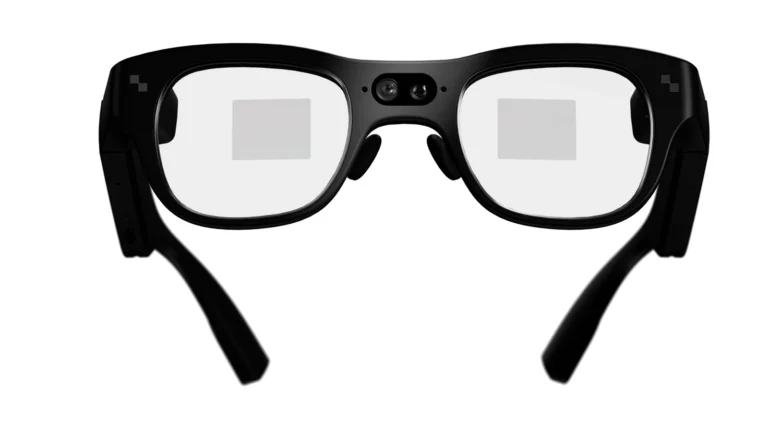
RayNeo X3 Pro seen from behind the lenses, with a light rectangle marking the display area in each lens and the two cameras in the bridge
RayNeo's render of the X3 Pro from the wearer's side, cropped with the brand logo excluded. The rectangles are RayNeo's marking of the display areas. The pixels are unmodified. RayNeo product imagery

The display is where the X3 Pro leads. Each lens has its own micro-LED projector and waveguide, so both eyes see the same image, where the Meta Ray-Ban Display puts a screen in one lens only. RayNeo rates it at 3,500 nits on average and 6,000 at peak, with a 30-degree field of view that it compares to a 43-inch screen two meters away. The resolution is modest at 640 by 480.

All three reviewers found it readable. Tom's Hardware called the waveguides bright and sharp with good color and bright enough for outdoor use, and Tom's Guide found them visible in bright surroundings. Notebookcheck adds a limit: there is no clip-on sunshade, so harsh sunlight is harder. Nobody has published a brightness measurement, so the nit figures are RayNeo's.

Gemini, apps and navigation

6.5/10Fair
A field with a horse and a flock of sheep, overlaid with an AI caption reading that a few horses are moving slowly across the field and a flock of sheep is grazing nearby
RayNeo's simulation of a Gemini answer in the X3 Pro display, cropped with the headline removed. It is a marketing composite, not a photograph through the lens. RayNeo product imagery

The glasses run RayNeo AIOS, an Android-based system with Gemini Live as the assistant. You long-press the left temple and ask about what the cameras see. Tom's Guide used it to plan a dinner from the contents of a fridge. RayNeo also lists real-time translation in 14 languages, heads-up turn-by-turn navigation through Google Maps, meeting transcription, a teleprompter and a to-do list.

The weak points are the joins between them. Tom's Guide found Gemini could not yet hand a request to the Maps app, and Tom's Hardware found that the assistant pointed it to navigation apps instead of starting a route. Third-party apps such as TikTok, Instagram and WhatsApp are available, but Notebookcheck found sideloading more apps needs developer tools. It also found that an iPhone gets fewer notifications than an Android phone.

A phone is needed for setup through the RayNeo AR app and helps with a hotspot away from Wi-Fi. RayNeo's product page and FAQ mention no subscription for the glasses' own features.

Comfortable, conspicuous and prescription-ready

6.0/10Fair
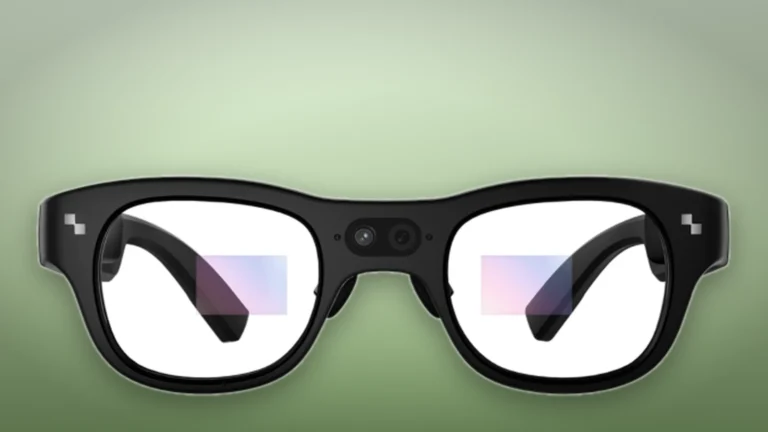
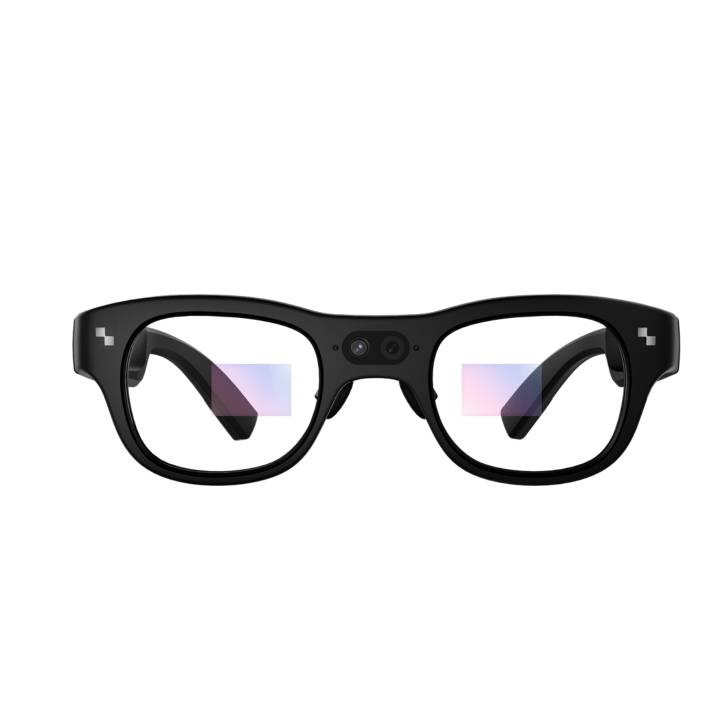
Front view of the black RayNeo X3 Pro frame with its two bridge cameras and faint display areas in both lenses, on a soft green background
Product illustration based on manufacturer imagery: RayNeo's front render of the X3 Pro on a generated backdrop. Product illustration based on manufacturer imagery (RayNeo render)

At 76 g the X3 Pro is light for AR glasses. Tom's Guide found it comfortable all day thanks to the weight distribution and cushioned nose pads, and Tom's Hardware found it not heavy on the face. Both were less kind about the looks: thick temples, projector bulges at the hinges and two cameras in the bridge, in mostly plastic that Tom's Hardware thought cheap for the price.

Prescription wearers can order custom inserts from RayNeo's partner Lensology, at extra cost. Our guide to prescription lenses for Rokid's glasses shows how that insert route typically works. A camera light on the front signals recording, which Notebookcheck sees as a necessary cue for people around you.

Where to buy

We have no current, in-stock price for the RayNeo X3 Pro AI+AR Glasses from the retailers we track. The links below go to the listings we last saw; the price shown there may have changed.

No retailer listing is on record for this exact model at the moment.

Prices and availability come from retailer feeds and change without notice; the retailer’s page is authoritative. We may earn a commission if you buy through these links.

Final verdict

RayNeo X3 Pro AI+AR Glasses
5.7/10Editorial ratingMediocre

Score breakdown

Scores run from 1.0 to 10.0: 9+ exceptional, 8–8.9 excellent, 7–7.9 good, 6–6.9 fair, 5–5.9 mediocre, below 5 poor. The overall score is the weighted average of the rated sections. Unrated sections do not count.

Pros

  • Full-color displays in both lenses
  • Three reviewers found the display readable outdoors
  • Gemini with camera input, translation and heads-up navigation on the glasses
  • Light enough that Tom's Guide found it comfortable all day
  • Charges to full in about 38 minutes

Cons

  • Reviewers got well under an hour of real use, and half an hour of video
  • The case cannot recharge the glasses, so a day out means carrying a power bank and a cable
  • Low resolution
  • The assistant does not yet pass requests to other apps
  • Plastic build and an obviously technical look
  • Prescription inserts cost extra
  • No independent lab measurements

Conclusion

These glasses show what full AR can do in 2026: two color displays you can read outside, an assistant that sees what you see, and directions floating in front of you. It also shows why most people should wait. With a battery that reviewers emptied inside an hour and a case that cannot refill it, every feature has to be rationed.

The Meta Ray-Ban Display, with its single-lens screen and a charging case, is the easier companion for a day out. Snap is also preparing its own Specs, and our report on the Snap Specs ship date tracks when a third option arrives. Buy the X3 Pro if you want to build for this category or explore it now, and accept that a power bank comes with it.

Andreea-Viviana Jitaru’s take

I'd only buy these to develop for them. The display and Gemini integration are ahead of what Meta sells, but I would not carry a device that needs charging after one navigation session. Before paying, I would want to see a current-firmware battery test, since RayNeo quietly removed its runtime claim instead of updating it.

Buy it if
  • Developers building AR apps
  • Early adopters who use AR in short, planned sessions
  • Travellers who want translation and directions in view for a few minutes at a time
Consider an alternative if
  • A full working day of use
  • You mainly want photos and music, where camera glasses without a display last far longer
  • Looks matter to you

Questions readers ask

How long does the RayNeo X3 Pro battery last?

RayNeo does not state a runtime on its current product page. Tom's Hardware got no more than an hour in general use on a pre-release unit, and Notebookcheck got around 30 minutes of continuous video recording.

Does the X3 Pro need a subscription?

RayNeo's product page and FAQ mention none for the glasses' own features. A phone is needed for setup through the RayNeo AR app.

Does it work with an iPhone?

Yes, through the RayNeo AR app. Notebookcheck notes that notification support is more limited on iOS than on Android.

Can I get prescription lenses?

Yes. RayNeo sends buyers to its partner Lensology for custom prescription inserts, sold separately.

How is it different from the Meta Ray-Ban Display?

The X3 Pro has full-color displays in both lenses and runs Gemini. The Meta Ray-Ban Display has a screen in one lens and a charging case.

Can the case charge the glasses?

No. Notebookcheck points out that the carrying case has no battery, so charging needs a USB-C cable.

About the reviewer

Editor

Andreea edits the written side of the site: the articles and the reviews. Her brief is to say what a feature list cannot, where a device is genuinely good, where it quietly compromises, and who should walk past it. A review that reads like marketing copy, or that praises a device without naming a drawback, does not go live.

This is a research-based assessment: the reviewer compiled it from published specifications, documentation and independent measurements rather than from testing the unit.

Profile and other work →

Sources

  • RayNeo, X3 Pro AI+AR Glasses product page, specifications and FAQ (read 25 September 2026)rayneo.com
  • Tom's Hardware, Brandon Hill, RayNeo X3 Pro AR glasses reviewtomshardware.com
  • Tom's Guide, TCL RayNeo X3 Pro AR smart glasses reviewtomsguide.com
  • Notebookcheck, Abid Ahsan Shanto, RayNeo X3 Pro review (23 December 2025)notebookcheck.net
  • B&H Photo, search 'smart glasses' sorted by best sellers (retrieved 25 September 2026)bhphotovideo.com
  • B&H Photo, RayNeo X3 Pro product listingbhphotovideo.com

← Back to the blog